Overview:
ShadowXafe is the next-generation data protection solution that brings comprehensive, SLA-driven management for the complete data protection lifecycle. ShadowXafe delivers dependable data recovery with an optimized, easy-to-use management workflow. Its powerful data protection is both host-based and agent-based, applicable for a wide range of workloads, physical and virtual, on premises and in the cloud. ShadowXafe ensures reliable data protection, reducing application downtime and improving productivity. In the event of system-wide failure, data corruption or natural disaster, ShadowXafe’s patented VirtualBoot technology allows organizations to perform a virtual machine recovery in milliseconds and restore their entire infrastructure in minutes. ShadowXafe provides total business continuity when integrated with Arcserve Cloud Services, our disaster recovery as a service (DRaaS) as a service platform.
One Solution for Your Data Protection Needs
ShadowXafe delivers powerful recovery and workflow-optimized management simplicity. ShadowXafe is easy to deploy and manage, and it ensures secure data protection, less application downtime, and improved productivity.
Data Recovery Made Simple
- Host-based and agent-based next-generation data protection
- Dependable complete physical and virtual system backup and disaster recovery
- Boot backup images as virtual machines (VMs) in milliseconds
- Recover to dissimilar hardware or virtual environments
Data Backup and Recovery Management at Scale
- Context-sensitive, policy-based administration
- Unified data protection lifecycle management
- SLA-driven dashboard and analytical reports
- Seamless VMware/Hyper-V integration
- Optimized for ease of use
- Microservices-based architecture for enterprise scalability
- Back up directly to the cloud
- Cloud-based management from anywhere at any time with Arcserve OneSystem
Total Business Continuity
- Tight integration with StorageCraft Cloud Services for true one-click DRaaS
- Policy setup provides DRaaS as an option for 100 percent business continuity
- Complete, orchestrated one-click failover
- Highest SLAs with one throat to choke for on-prem as well as cloud backup and recovery
ShadowXafe’s Architecture
Designed for scalability, ShadowXafe’s microservices-based architecture can rapidly deploy service nodes for an unlimited number of sites. It includes a collection of interconnected, scalable, and easily manageable microservices that deliver robust data protection and storage access. There are three main components: Data Protection Services, Agents, and OneSystem®. The Data Protection Services deliver storage access and data protection procedures including backup, restore, replication, and storage. Agents are adapters for protecting physical servers and virtual machines (VMs) to deliver higher SLAs. is the cloud-based management service (which can also be on-premises) that orchestrates and manages the activities within Data Protection Services. It provides real-time monitoring, reporting, and visibility from any location.
Instant Restore with VirtualBoot
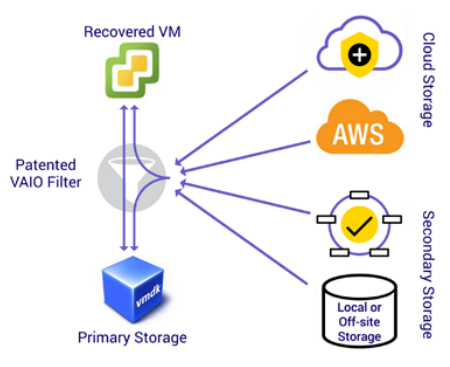
The patented Arcserve VirtualBoot technology instantly restores data, directly from the backup images, and gives full access to system resources and applications in seconds. There is no need for VMware Storage vMotion as data can be accessed directly on the primary storage. VirtualBoot is built on VAIO filter and performs advanced intelligent I/O read-ahead to deliver the data before it is needed. Although rapid failover in the event of a disaster is the most critical function of VirtualBoot, it provides various other valuable functions including:
- Confirm and validate backup images proactively
- Act as a temporary solution to minimize downtime during server migration
- Test software packages Provide application/kernel updates before production deployment
- Access applications from a specific point in time to export data from applications
Instant Restore with VirtualBoot
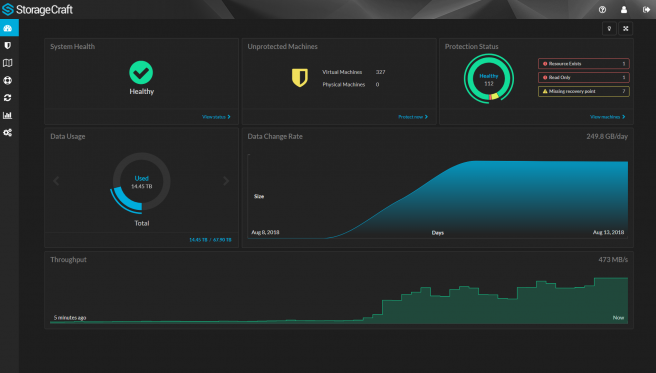
The data protection workflow is managed through OneSystem, a cloud-based unified management platform featuring a true SLAbased protection framework. The dashboard gives an overview of the health of the system. Policy creation is intuitive with all the ingredients that make up the SLA―backup frequency, retention policy, target location, replication for offsite disaster recovery― in a single location. Once created, the SLA protection policy can be applied to any combination of virtual and physical machines.
Features & Benefits:
Management Simplicity
Single pane of glass for ease of management
- Intuitive SLA-based data protection workflow
- Supports both cloud-based and on-premises deployments
- Highly scalable architecture - fast and simple to deploy
- Optimized for ease of use
- Simple backup scheduler - daily, weekly, monthly
- Drives both ShadowXafe & OneXafe Solo
- Status notification emails
Flexible Recovery
Recover to dissimilar HW or virtual environments
- Ensures that recovery is timely & quick (v2v, p2p, v2p & p2v)
- Utilize resources on hand. No waiting for any specific resources
Instant Recovery
Quickly recover files/folders and entire system in seconds
- Recovery using VirtualBoot IO read-ahead technology, irrespective of the VM size
- Direct recovery to primary store means no Virtual Storage Motion and no performance impact during recovery
- Compression optimized for backup and restore speed
Reliable Recovery & Data Integrity
Dependable recovery
- Supports Hyper-V, vSphere, and ESXi (agent and agentless)
- VMware Certified VAIO filter driver for VirtualBoot restores
- Automated, advanced reverification of backup images along with inflight verification ensures dependable backup images
- Integration with 3rd party clouds (AWS, Azure, Wasabi) for off-site copies and cloud object lock for data immutability
- Smart retries, and self-healing repairs ensures service reliability
- Retained metadata for improved recovery experience
- Cold file access technology for file folder recovery
- AES 256-bit encryption for data security (in-flight and at rest)
- Best-in-class certified VSS integration for app-consistent data protection
- Two-factor authentication
Integrated Disaster Recovery as a Service (DRaaS)
Total business continuity
- Orchestrated, one-click virtual failover
- Back up directly to the cloud
- Efficient WAN optimized replication to another site or StorageCraft Cloud services
- Replication to another site or Arcserve Cloud Services
- Seed/BMR drives and web download
Cloud Services:
Cloud-Based Backup and Disaster Recovery Solutions
Protect on-premises business systems and data in a cloud purpose-built for total business continuity.
Cloud Backup and Recovery Is Where Uptime Comes From
Local backups are usually enough to recover IT systems from server failure and other common problems. But a site-wide disaster will destroy those backups and result in major downtime and data loss for a business. Arcserve Cloud Services is a cloud-based disaster recovery as a service (DRaaS) solution.
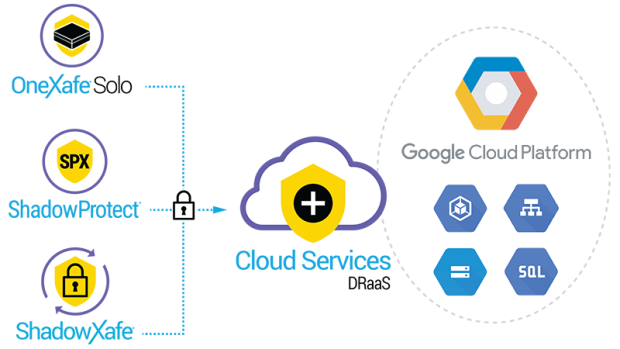
When paired with Arcserve’s backup and recovery solutions, Cloud Services (DRaaS) ensures complete and reliable business continuity. It is architected from the ground up to streamline data backup and recovery management, and to get critical systems back online with speed and ease. You can replicate backup images from OneXafe, ShadowXafe, OneXafe Solo, or ShadowProtect, to our Cloud Services (DRaaS), giving you the tools you need to keep business running no matter what happens.
Business Continuity
Access cloud data anywhere, anytime using this highly distributed and fault-tolerant disaster recovery cloud with 99.999+ percent uptime. Our premium-level cloud features the patented ability to pre-stage site-wide failover processes so you can test or execute a failover with the click of a single button.
Offsite Disaster Recovery
StorageCraft disaster recovery as a service (DRaaS) offers everything from file and folder recovery and machine virtualization to instant failover of an entire site and network.
Single Pane of Glass
Centrally manage through an easy-to-use, self-service online portal. Our privacy and security measures ensure that only you can access stored backup images. Additionally, complete control over networking allows for seamless failover during a disaster.
Google Cloud Platform
Arcserve recently enhanced our Cloud Services to take advantage of the power of Google Cloud, including its global scale, speed, elasticity, and data security. Our partnership with Google Cloud Platform (GCP) provides you with unmatched business continuity solutions for all data environments regardless of size, complexity, and location.
Features and Benefits
Security and Availability
Know that your offsite data backup is safe and always available inside our distributed, scalable, fault-tolerant cloud built specifically for disaster recovery.
Customization
Customize cloud storage to fit your needs, whether your IT environment is small and straightforward or large and complex. Choose the Service Level based on your needs. Enjoy low costs, control over cloud settings, and predictable monthly pricing.
Control and Flexibility
Centrally manage and monitor all your Arcserve Cloud Services™ accounts as well as fail over in a disaster without third-party intervention.
Advanced Network-Recovery Options
Hit the ground running after a disaster with advanced networking features (available with Cloud Premium) that enable you to run your network in our cloud just as you'd run it onsite.
One-Click Failover
Use Virtual Machine Policy (available with Cloud Premium) to configure the sequence, order, and timing for each mission-critical system, and to be able to press just one button to test or start site-wide failover processes.
Supported Operating Systems:
ShadowXafe supports the following operating systems with agent-based protection. Agents can be installed on physical servers or virtual machines (VMs).
Note: ShadowXafe supports only 64-bit Agent operating systems. The Windows Agent MSI blocks installation on 32-bit operating systems.
- Windows Server 2019 x64
- Windows Server 2016 x64
- Windows Server 2012 R2 x64
- Windows Server 2012 R2 x64 Foundation
- Windows Server 2012 x64
- Windows Server 2012 x64 Foundation
- Windows Server 2008 R2 x64
- Windows Server 2008 R2 x64 Foundation
- Windows 10 (64-bit)
- Windows 7 (64-bit)
Note: Secure Boot on Windows 7 is not supported.
With agentless protection, ShadowXafe supports the same guests (VMs) that Hyper-V supports for Windows Server 2019 x64, Windows Server 2016 x64, and Windows 10 Pro.
For a list of supported guests, see:
With agentless protection, ShadowXafe supports what VMware supports for ESXi 6.0 or later.
Requirements
For Hyper-V
See
Deploying and Registering in Hyper-V for details
For VMware
- System Requirements for deploying ShadowXafe:
- At least one Network Interface Card
- 10 GB free on the datastore
- Supported Browsers: Chrome, Firefox, and Edge.
- vCenter must support clustering if you want to use VirtualBoot.
Processors and Memory
- OneSystem - ShadowXafe automatically configures 4 processors and 16 GB of RAM for OneSystem during deployment. You can increase these values for the machine if needed.
- Service Node - ShadowXafe also automatically configures 2 processors and 4 GB of RAM for Service Nodes during deployment. You can increase these values for the machine if needed.
Limitations
- Do not use root as the admin account username for the ShadowXafe appliance.
- RDM disks are only supported via agent based protection.
- ShadowXafe connects with SMB 2.1.
- SMB 1.0 and 2.0 servers cannot be used as storage targets.
- Some NAS devices require SMB 3 to be enabled in order to enable 2.1
- APFS, LVM, ReFS, XFS, and Windows Dynamic disks cannot be used for file and folder recovery.
- Cannot use Windows Server Cluster Shared Volumes.
- Additional steps are required to virtualize EFI machines in the cloud.
- The Windows Agent for ShadowXafe does not protect dynamic disks. For example, a spanned volume on a Windows Agent can't be protected.
Not Supported
- Backups on ESXi version 5.5 or older.
- EBR is not supported for agent based backups.
- Agent-based backup on Volumes with deduplication.
- Agent-based backup of Windows Server Cluster Shared Volumes (CSV).
- Agent-based backup of Distributed File systems (DFS).
- Agent-based backup of Windows Storage Spaces storage pools.
- File recovery on File systems that have Data deduplication enabled.
System Requirements:
Requirements and Prerequisites
The requirements for setting up and running ShadowXafe include:
- The system where your Hosts and VMs run (VMware vCenter and ESXi versions 6.0 through 6.7).
- Virtual Machines/Hosts
- The Deployment Tool from StorageCraft
- The storage destination - any NFS, SMB, or iSCSI devices accessible to ShadowXafe.
- System Requirements for deploying ShadowXafe:
- A minimum of 4 GB RAM
- A minimum of 2 dual core processors
- At least one Network Interface Card
- 10 GB free on the datastore
- Ports 443 (SSL), ports 40049 through 40056 for control and data (port 40051 is used for data control).
- Defragmenting disks before backing up a machine can reduce the size of the backup image.
Documentation:
Download the Arcserve ShadowXafe Data Sheet (PDF).